

Play the piano and keep what you played as sheet music
Piano Composer is an on-screen piano for iPhone and iPad. Tap Record, play a phrase, and save it as a titled score you can replay with a moving cursor, then export it as PDF, MusicXML or MIDI.
- 88-key sampled piano with sustain and a metronome
- Record what you play and save it as sheet music
- Import and export MusicXML, MXL and MIDI; export PDF
Buy once. No ads, no subscription, no in-app purchases.
Features
An 88-key piano that fits your screen
The piano uses sampled sounds with multiple velocity layers, plus an on-screen sustain control and a metronome. On a full-width iPad, all 88 keys appear in two rows. On iPhone and in compact iPad windows, you pick the keyboard range you want to play.
Record a take, get a score
Tap Record, wait for the count-in, play, and tap Stop. Give the take a title and it's saved as sheet music on your device. Recording captures the notes you play on the screen, not microphone audio, so the app never asks for microphone access.
Watch it play back
Open any saved score and press play. A cursor moves through the sheet music and the matching piano keys light up, which makes it easy to check a phrase or see what you actually played.
Import and export the formats musicians use
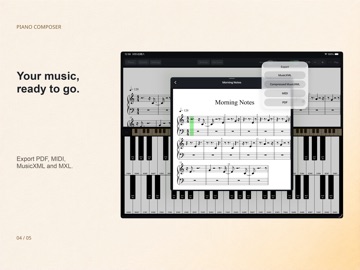
Import MusicXML, MXL or MIDI files, or open them straight from the Files app. Export your scores as PDF, MusicXML or MXL, or as MIDI for use in other music software. When you import a file, the original is kept and can be exported again unchanged.
A quiet place to play
No banner ads over the keyboard, no pop-ups between takes. No subscription, no in-app purchases, no account and no tracking. Piano Composer works offline, and the App Store privacy label says "Data Not Collected".
Use cases
- Catching an idea: record a melody the moment it comes to you and keep it as a titled score.
- Practice checks: replay a phrase with the moving cursor and highlighted keys to see where the notes went.
- Sharing with a teacher or bandmate: export a PDF to print or send, or MusicXML to open in notation software.
- Moving into a DAW: export MIDI and keep working on the idea in your music software.
- Playing on an iPad: use the two-row 88-key layout without carrying a keyboard.
- Version
- 1.0.0
- Size
- 78.1 MB
- Released
- 2026.09.16
- Updated
- 2026.09.17
- Requires
- iOS 18.0+
- Age
- 4+
Screenshots



FAQ
- How much does Piano Composer cost?
- It's a one-time purchase of $1.99 on the App Store (price may vary by country). There are no ads, subscriptions or in-app purchases, so everything is included.
- Can I edit the notes in the sheet music?
- No. Scores are read-only: you can record, title, replay and export them, but note editing isn't included. If you need to edit, export MusicXML or MIDI and open it in an editor of your choice.
- Does it record through the microphone?
- No. Recording captures the keys you play on the on-screen piano, not sound from the microphone. The app doesn't request microphone access.
- Which file formats can I import and export?
- Import: MusicXML, MXL and MIDI. Export: PDF, MusicXML, MXL and MIDI. PDF is export-only. Imported originals are kept and can be exported separately.
- Does it work offline? Do I need an account?
- It works offline, with no account, no ads and no tracking. Your recordings are stored on your device, and the App Store privacy label says "Data Not Collected".
- Does it work on iPhone and iPad?
- Yes, on iPhone and iPad with iOS / iPadOS 18 or later. On a full-width iPad you get all 88 keys in two rows; on iPhone you choose a keyboard range.