
The Screen Is Not the Battle
Making Games with AI · Part 4
This article looks back at battle presentation in June–July 2026, using records through August 1, 2026. The images, HUD, and refresh behavior reflect that period.
In part 3, we built the rules for a battle that could run from start to finish. This article follows the next handoff: how those rules become the scene, controls, and feedback the player sees.
Pause a battle in Kibble Street TD and you can see characters, buildings, health bars, damage numbers, unit cards, and an energy meter. Together, they create the player's sense that a battle is happening. Yet no image decides who takes damage, and no button creates a unit on its own.
The battle runs in another layer: elapsed time, available energy, unit positions, current targets, hits, building health, and the final outcome. The screen translates those states into shapes, movement, and sound that the player can understand.
This distinction has a practical purpose: when rules and visuals make decisions on each other's behalf, changing an animation, interface, or frame rate can accidentally change the battle's outcome.
One battle moment has four layers
At the development stage covered here, one frame of Kibble Street TD could be understood as four connected layers, each with a different job.
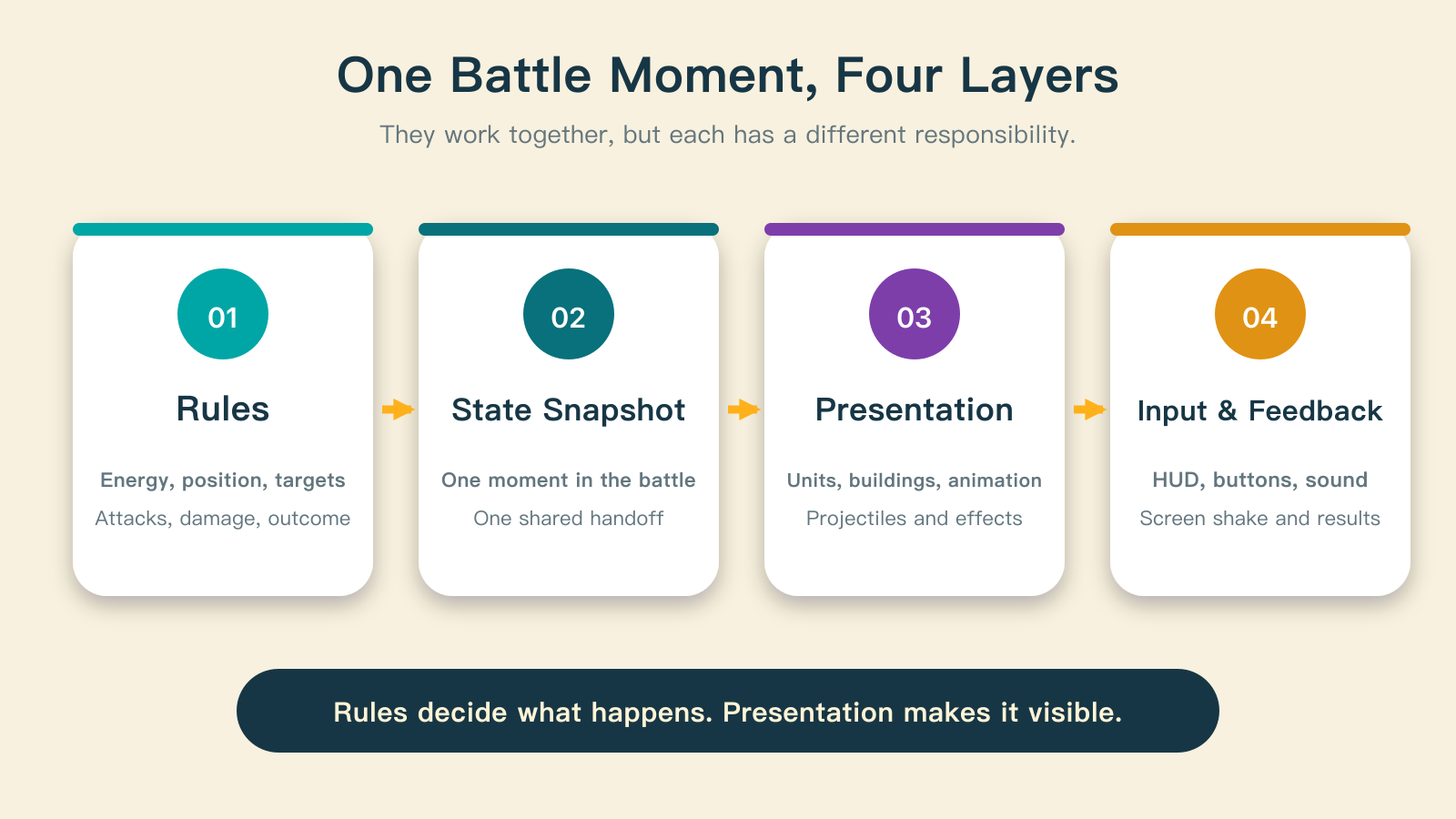
The first layer calculates the rules. It advances energy, positions, targets, attacks, damage, and the outcome. It is the authoritative source of what happens in the battle.
The second layer produces a snapshot: a shared account of the current time, units, buildings, projectiles, hit events, and result.
The third layer presents the scene. It uses that snapshot to create or remove characters, place buildings, select animations, and draw projectiles, hit effects, and damage numbers.
The fourth layer handles input and feedback. The HUD shows health, time, energy, and cooldowns. Buttons send the player's requests back to the rules. Sound and screen shake make the results easier to notice.
All four contribute to the experience, but they have different authority. The rules decide what happened. Presentation decides how the player perceives it. The input layer can make requests.
Clicking a unit card does not place a character directly
Summoning makes this boundary easy to follow. When the player clicks a unit card, the interface checks the displayed energy, cooldown, and availability. An active cooldown stops the request. If energy alone is insufficient, the cost number shakes. If the conditions are met, the interface sends a summon request to the battle system.
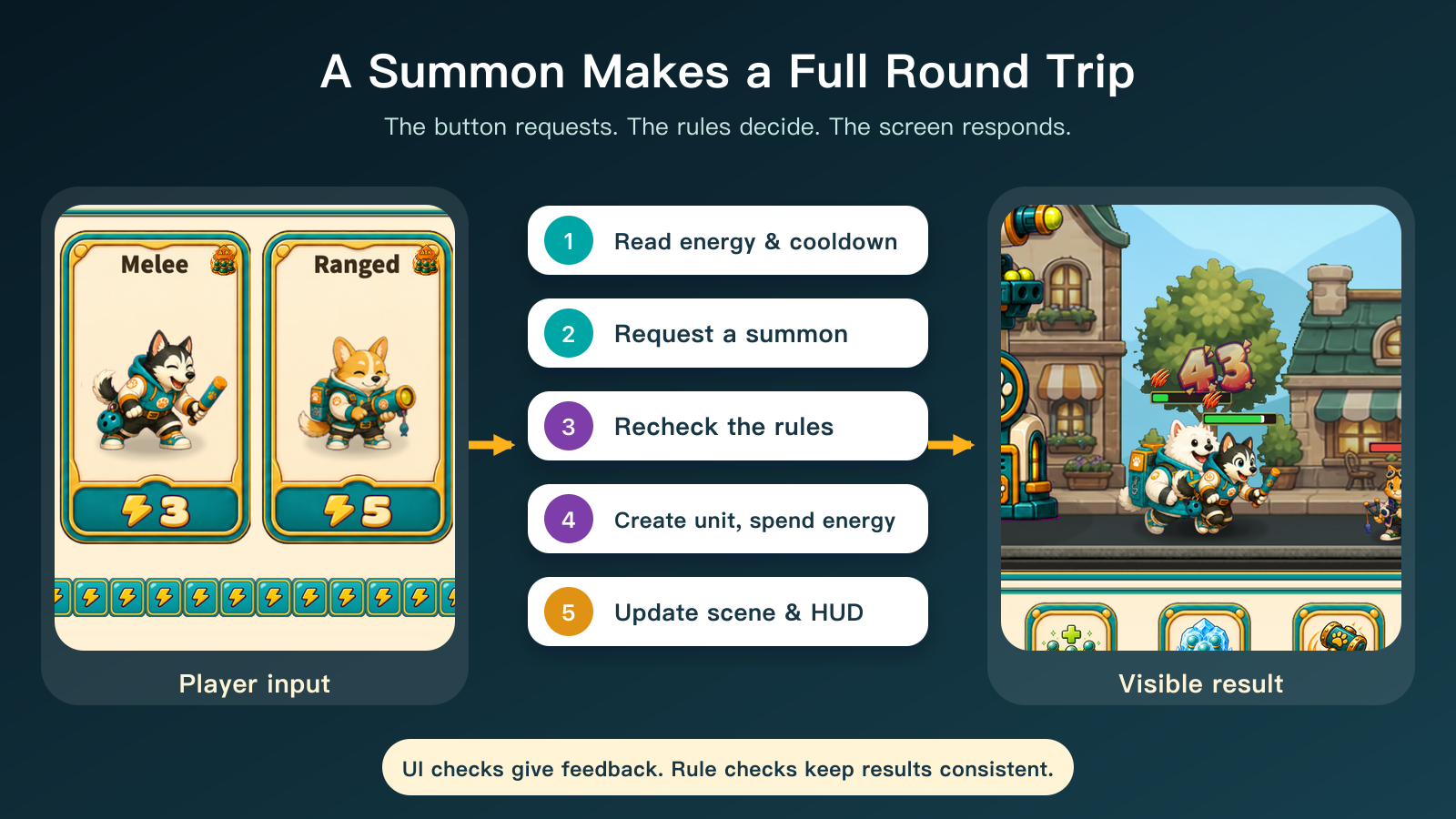
The rules check the request again. Has the battle started? Has it ended? Is the unit in the current formation? Is there enough energy? Has its cooldown finished? Only after these checks pass does the system create the unit's state, subtract the energy cost, and set the next time it can be summoned.
A fresh snapshot follows immediately. The battlefield sees the new unit state and creates its character. The HUD sees the changed energy and cooldown and updates the card and meter. Once the controller knows the summon succeeded, it plays the summon sound.
The round trip establishes a useful principle: the button is an entry point for a request, not the judge of the rules. The interface checks early to provide quick feedback. The rule layer checks again so that every request follows the same conditions, wherever it comes from.
The snapshot is a contract between rules and visuals
The snapshot described here includes time, player energy, both sides' units, buildings, damage events, projectiles, hit effects, warnings, chests, and the battle outcome. The screen does not have to guess who is alive or attacking, or calculate damage again.
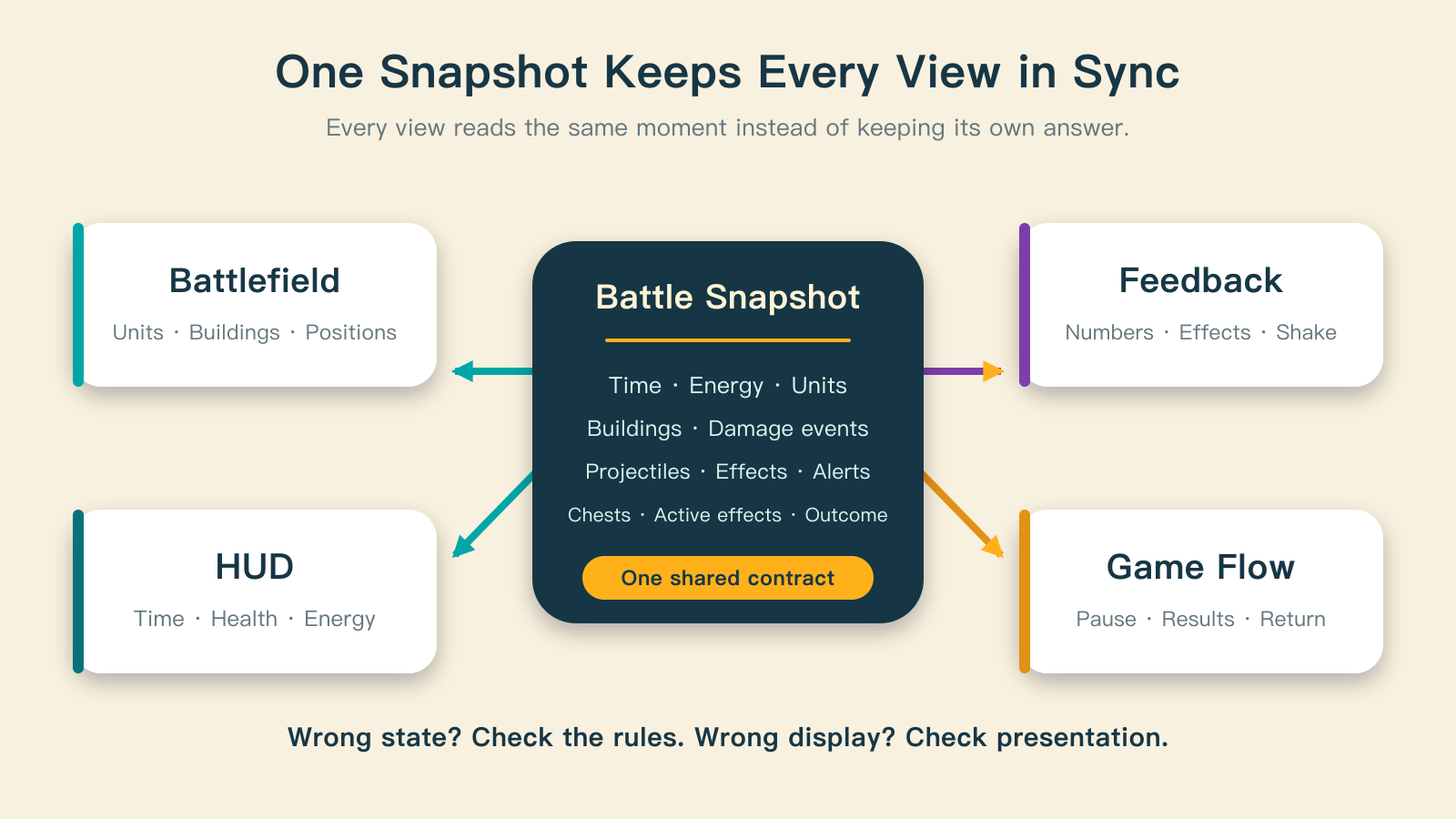
The scene reads units and buildings. The HUD reads time, health, and energy. Audio observes battle events. The results flow waits for the final outcome. These consumers read from the same source instead of maintaining conflicting answers.
They can also refresh at different rates. During this period, the battlefield received state at roughly 30 updates per second. The HUD refreshed less frequently, with immediate updates when important values changed, such as whole-number energy, building health, or the outcome. The rules continued advancing energy and health; every text label did not need its layout recalculated on every frame.
The snapshot also gives debugging a useful boundary. If health is already wrong in the snapshot, investigate the rules. If the snapshot is correct but the health bar is wrong, investigate presentation. The two problems no longer have to be diagnosed as one.
Animation translates state
A moving unit uses its run animation. An attacking unit switches to its attack animation. A unit entering its death phase plays a death animation. Surviving units can enter a victory pose when the battle ends.
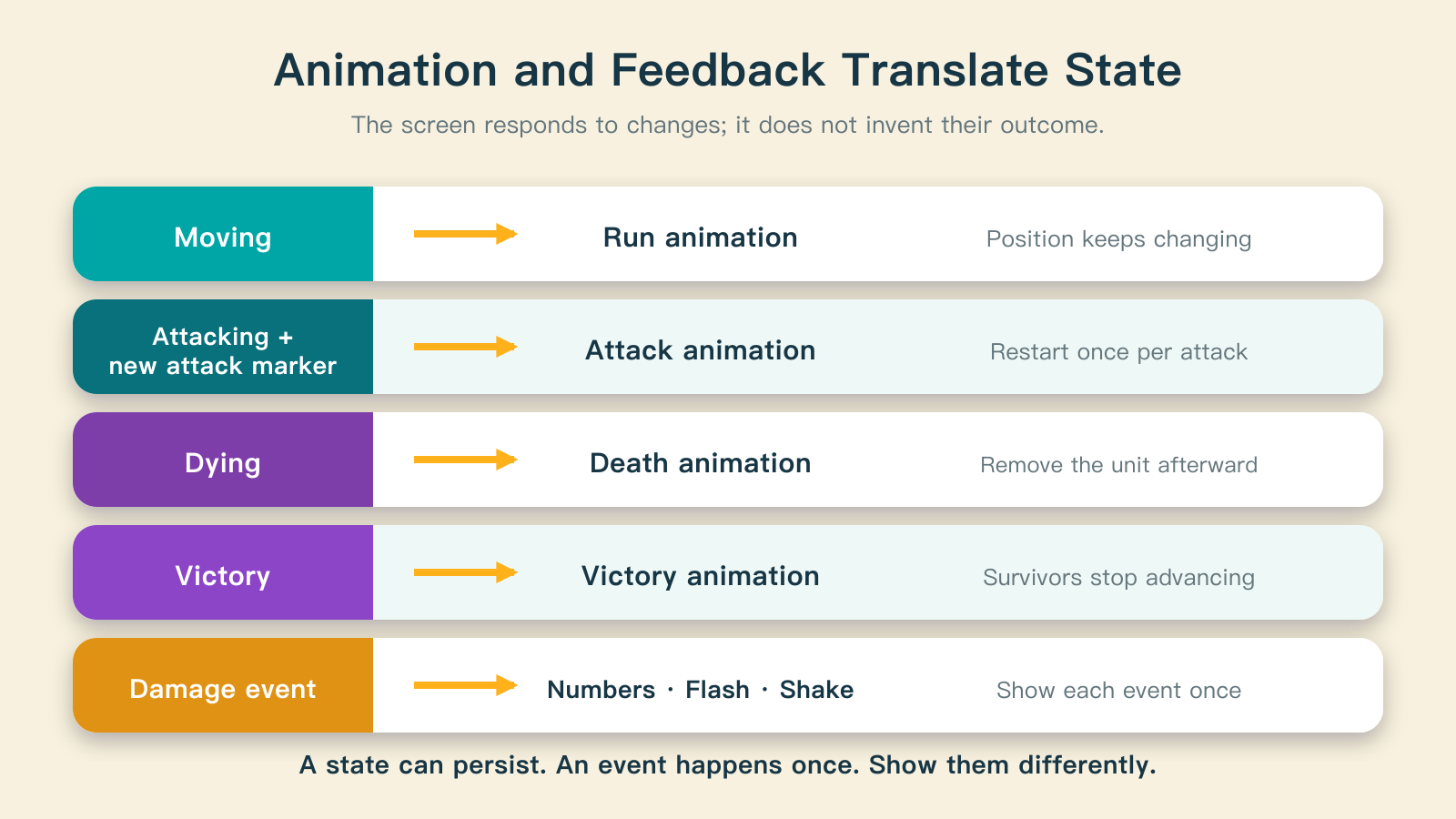
An attacking state can last through several attack cycles, so that state alone cannot tell the renderer when to restart the animation. The system also records a marker for each new attack. When the marker changes, presentation starts the attack animation once. It does not keep restarting the animation merely because the unit remains in an attacking state.
Hit feedback uses a similar approach. Damage creates an event with a unique identifier. Presentation uses it to show a flash, recoil, a number, or screen shake, then records which events it has shown. Reading the same recent event in several snapshots should not produce several sets of damage numbers.
Animations, playback speeds, and character art can change. As long as the state meanings and handoff stay consistent, those presentation changes should not alter the battle's result.
Feedback can enrich a result without changing it
One hit may reduce a health bar, display a damage number, show a scratch or explosion, make a character recoil, shake the camera, and play a sound. These are several ways to communicate the same event.
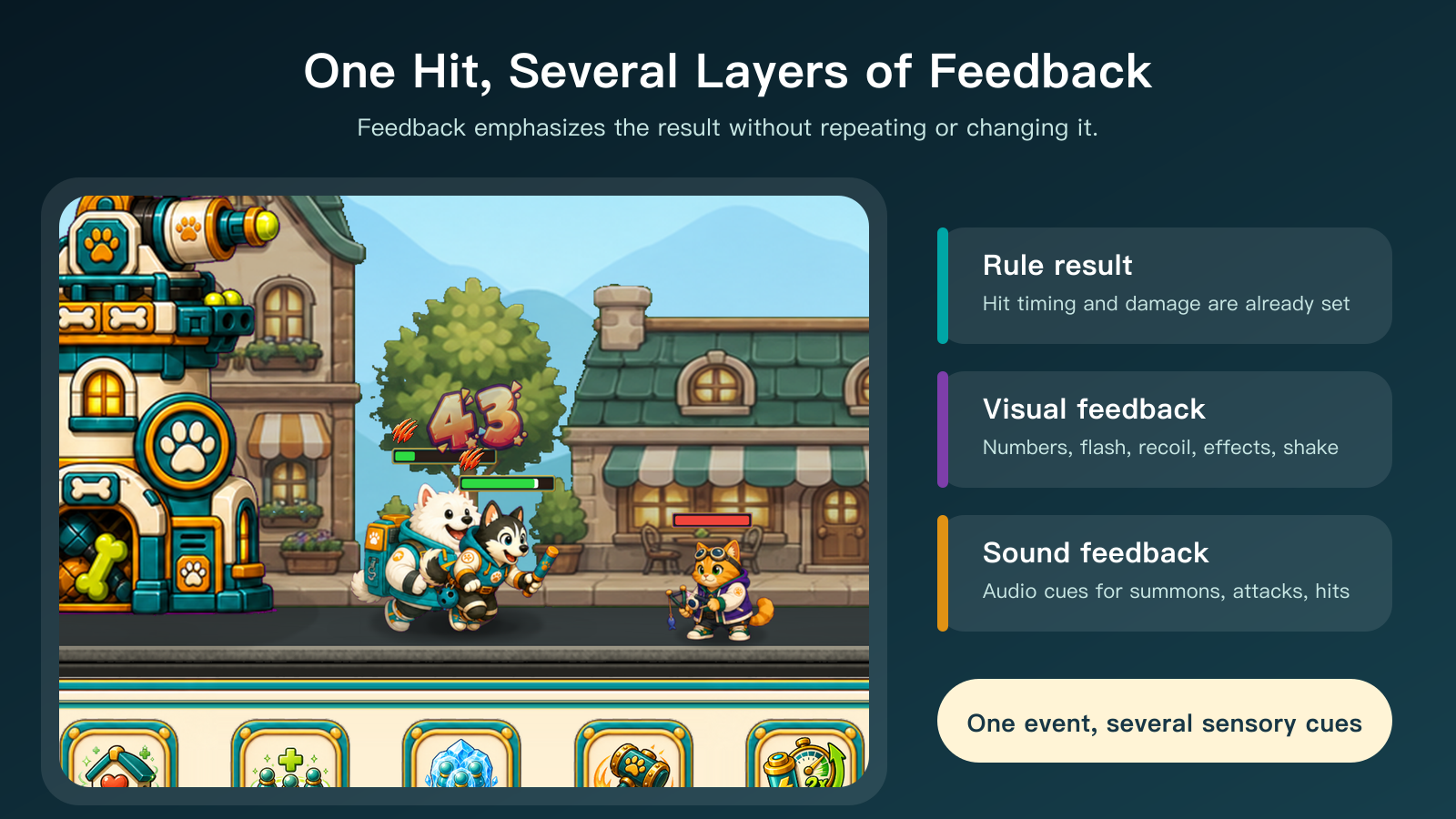
The damage amount and hit timing belong to the rules. Number styling, flash strength, shake intensity, and sound belong to presentation. A heavy attack can use stronger feedback than an ordinary hit. A slow effect must not cause presentation to subtract health again.
Separating the layers also helps describe defects precisely. If health drops correctly but there is no sound or hit reaction, feedback is missing. If the number appears twice but health falls once, an event has been displayed twice. If health drops before the projectile reaches its target, rule timing and visual timing are out of sync. These may look like similar problems, but they have different causes.
The HUD is a dashboard
The battle's top area displays base and tower health, the level, time, chests, and control buttons. The lower area shows items, four unit roles, costs, cooldowns, and energy. There is a lot of information, but it should all come from the battle state. The interface should not keep a separate version of the truth.
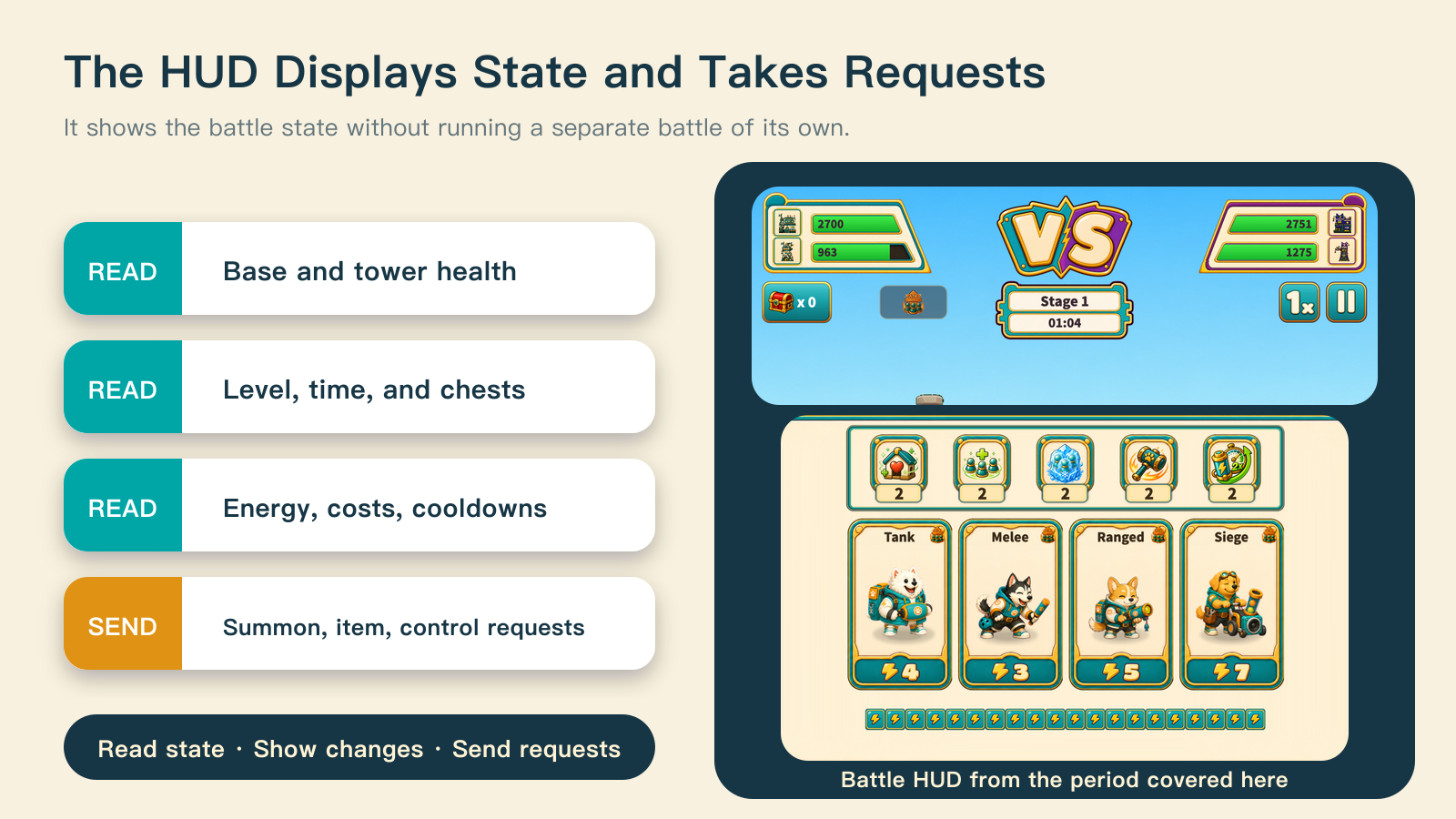
For example, a unit card's availability comes from command state calculated by the rules. During preparation, tutorials, pauses, or results, the controller can lock interaction. This prevents new requests; it does not quietly change energy or unit state.
As presentation grew, its organization changed too. Early battlefield rendering was concentrated in one scene module, while the HUD handled substantial layout and interaction work. Later, these responsibilities were divided into backgrounds, buildings, units, effects, mechanics, drops, the top bar, commands, preparation, and results. The rules were not rewritten by that split. Each part of presentation became easier to maintain within its own responsibility.
Who was responsible for this stage?
The person decided what the player needed to see: which changes required immediate feedback, which information belonged in the HUD, how attacks and outcomes should feel, and whether the screen accurately communicated the rules.
AI helped trace the full path, match state to presentation, implement event mappings, and repeat checks. When something went wrong, it helped locate the problem in input, rules, the handoff, or display.
The engine rendered nodes, animations, and the interface. It did not define what counted as a correct battle result.
Building your own presentation layer
Start with one authoritative battle state and make each view read from it. Treat buttons as requests rather than letting them directly change characters or resources. Define how movement, attacks, death, and outcomes map to presentation. Give one-time feedback identifiable events. Then check both the calculated result and what the player actually sees.
This adds an explicit handoff to the prototype. It also gives later animation, interface, and mechanic changes a clearer boundary, making it easier to find where they interfere with one another.