Why a Finished Battle Is Not a Finished Game
Making Games with AI · Part 5
This article looks back at the complete game loop in June–July 2026, using records through August 2, 2026. Home, shop, progression, and save behavior reflect that period.
Previous: The Screen Is Not the Battle
If Kibble Street TD opened straight onto the battlefield, players could already summon units, attack buildings, and reach a win or a loss. That was an important milestone for testing the core gameplay. But once the battle ended, a different set of questions appeared.
Which faction should a new player choose? Would they have to choose again the next time they opened the game? Where did victory rewards go? How was the next level selected? Where could players spend their resources? Would their items, formation, and preferences survive a restart? Without reliable answers, we had a working battle, but not yet a game that players could keep playing.
A battle sits in the middle of a larger loop
A battle prototype has clear boundaries: enter the field, run the rules, and produce an outcome. It can answer “Does the core gameplay work?” It cannot, on its own, answer “What makes the next battle worth playing?”
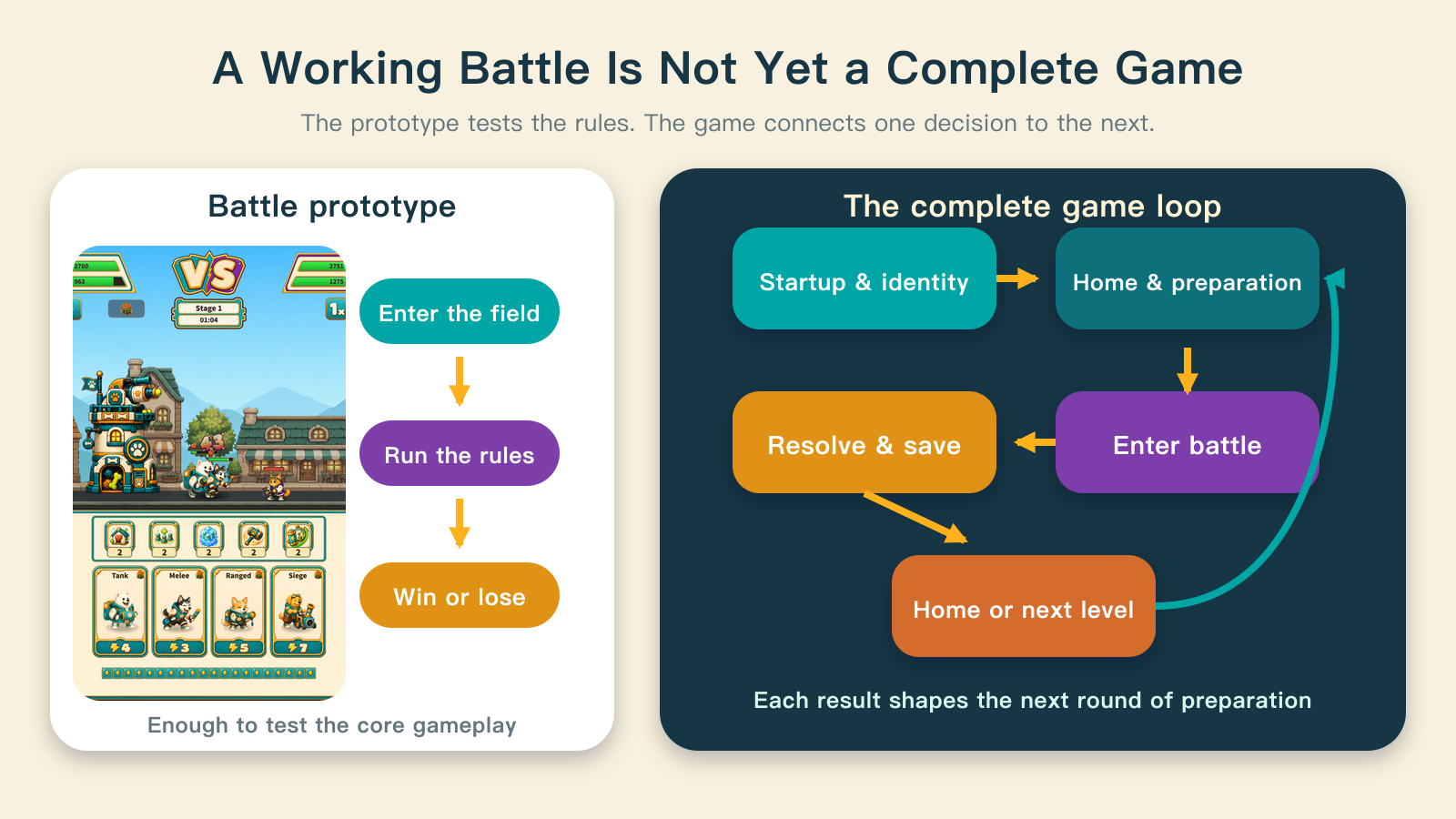
A complete game needs a stage on either side of the battle. Before it, players prepare their faction, level, upgrades, formation, and items. After it, the game resolves rewards, advances progress, saves the changes, and returns players to somewhere they can make another decision.
Both sides affect the next battle. Upgrades change lasting abilities. Formation determines which units take part. Item inventory limits the available choices. Level progress determines what comes next. A win or loss becomes part of a repeating loop: invest, fight, collect the result, and invest again.
Startup first asks: new player or returning player?
At the development stage covered here, Kibble Street TD had two startup paths. A new player with no saved faction reached faction selection after the essential content loaded. The game saved that choice before preparing the matching Home screen. A returning player skipped the choice and entered Home with their saved faction and progress.
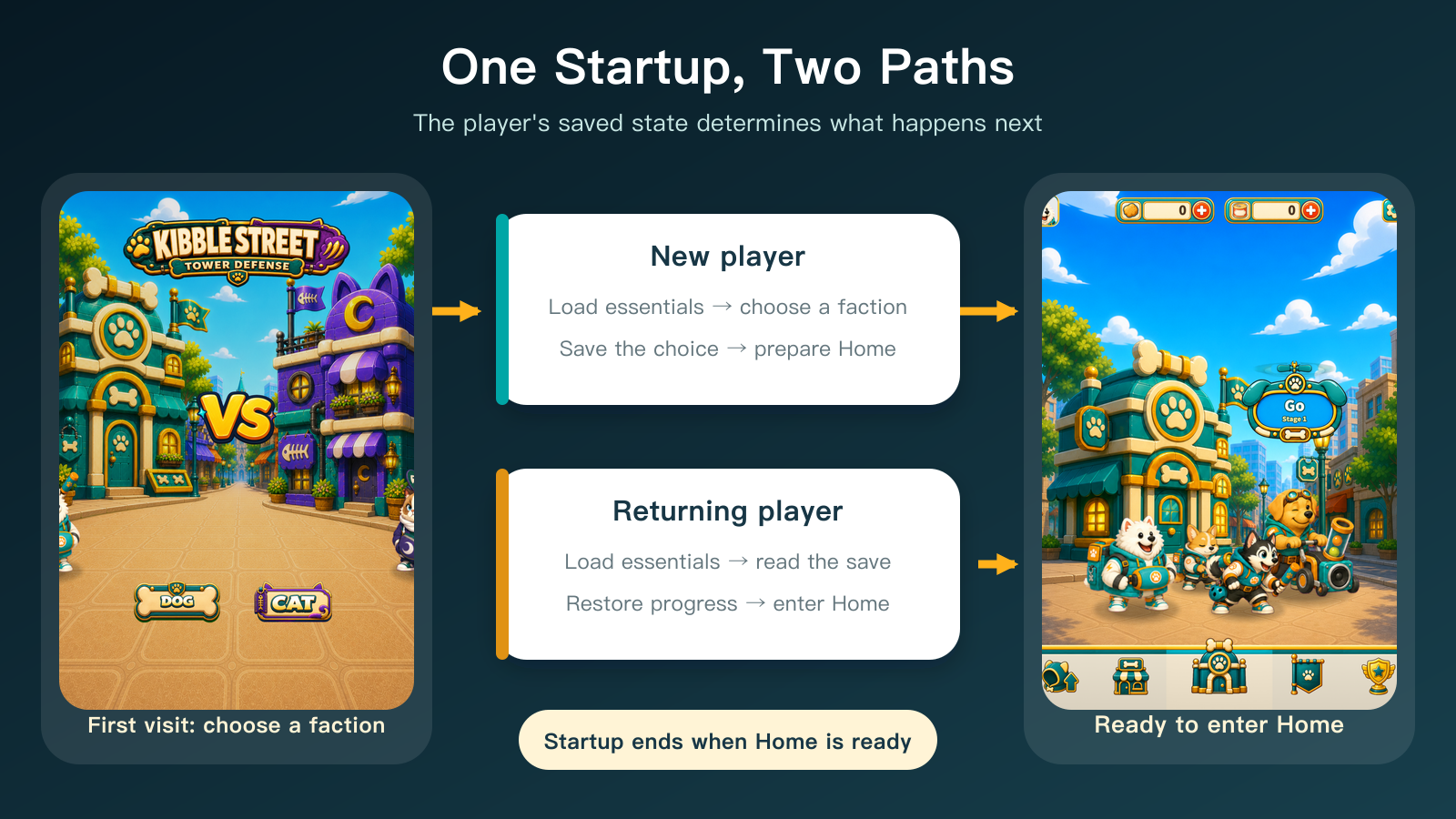
The point was not simply to add a selection screen. Startup had to agree with the saved state. A faction could not exist only as a selected button, or the next session would have no way to know the player's choice. Home could not accept input before its essential resources were ready, either. Seeing a screen and being able to use it are different milestones.
The flow therefore considered Home interactive only after its entrance animation finished and the input block was removed. If essential content failed to load, startup stopped at an error screen with a retry action instead of continuing with missing resources.
Home is the hub of the game
The Home screen at that time brought together the player's faction, two currencies, the next-level entry, and four unit roles. The bottom navigation led to upgrades, the shop, formation, and rankings. Settings in the upper-right handled preferences and save-related actions.
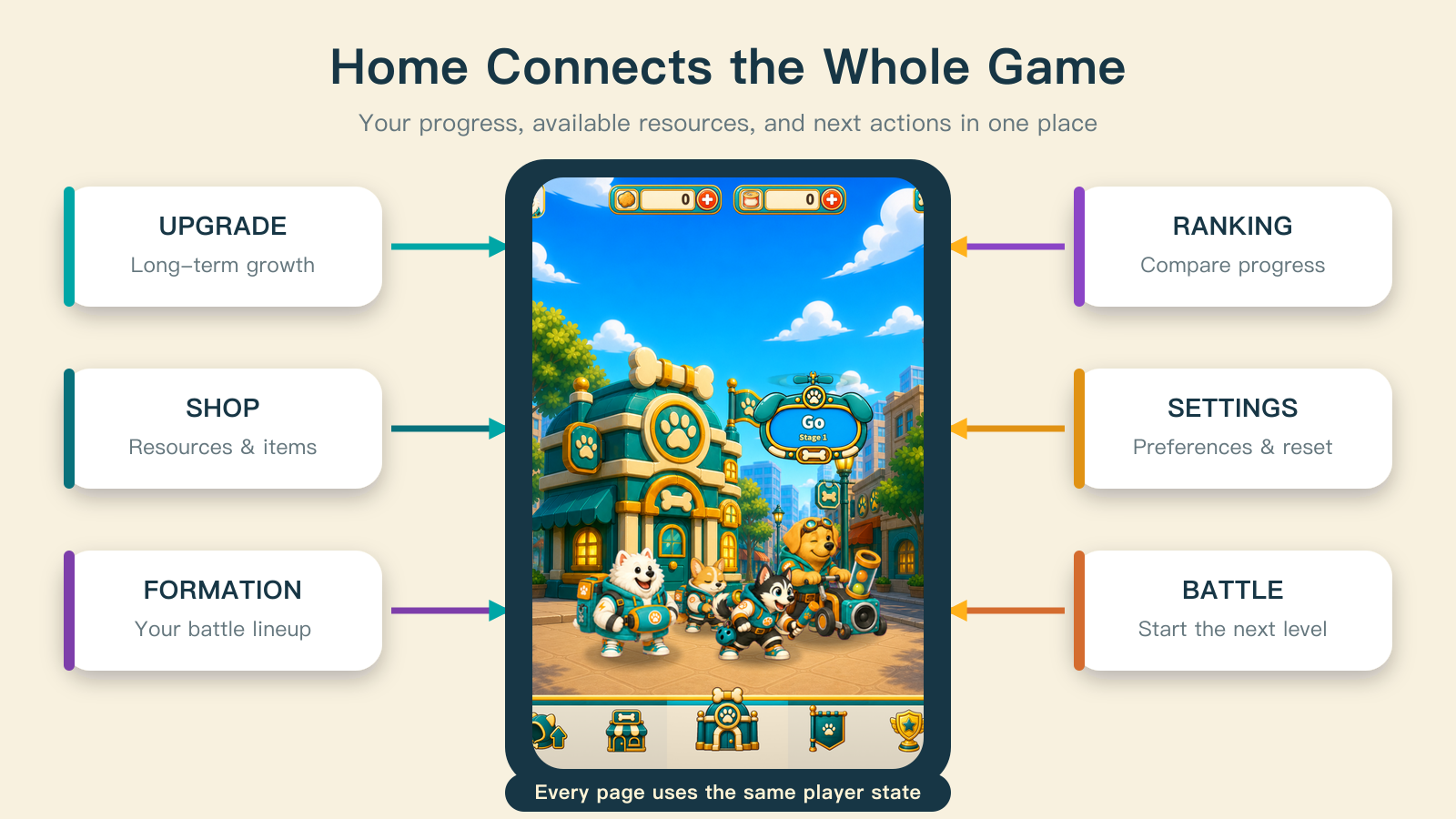
These destinations used one set of navigation rules. Upgrades, the shop, formation, and rankings changed the content over the Home backdrop. Battles used a separate page, while settings could appear over the current one. Back navigation, repeated-click protection, and system unlocks were handled through the same routing entry points, rather than being reimplemented by every button.
The GO button did not read a hard-coded level number from its label. It worked out the next level from the highest level already cleared. Some systems also unlocked as progress advanced. Home made two things clear in one place: where the player was now, and what they could do next.
Pages outside battle give its results a purpose
The upgrade page handled lasting growth: turning earned KIBBLE into abilities that could matter in the next battle. The shop organized currencies, items, and packs, giving resource gains and spending a clear place. Formation determined the unit lineup for the next fight. Rankings placed personal level progress in a wider comparison. Settings handled sound, haptics, changing factions, and starting again—choices that did not belong on the battlefield itself.
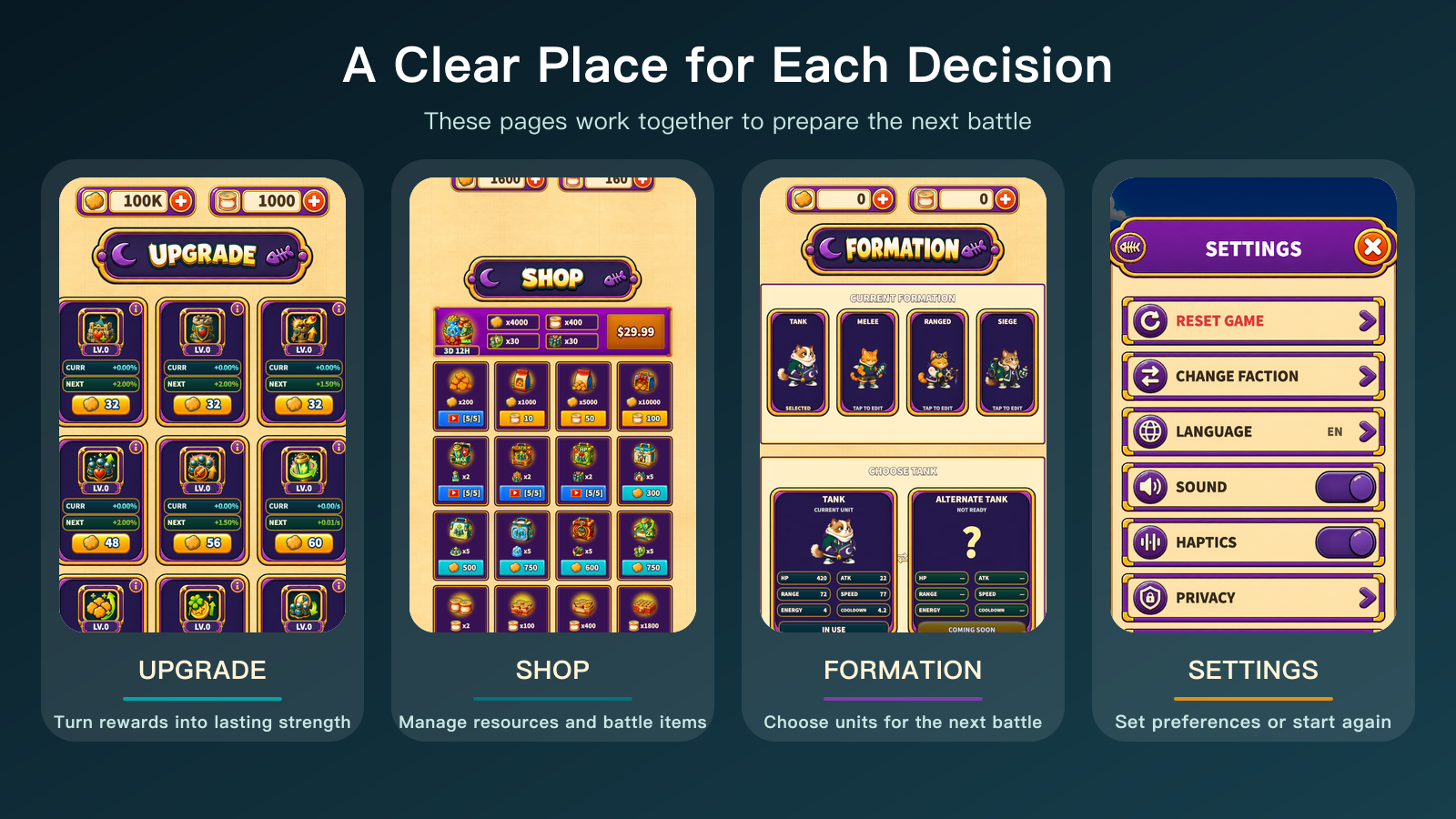
The shop image preserves the pack page from that development stage to explain the division of responsibilities. It is not a list of what the current Android shop offers.
These pages were not there merely to make the main screen look more feature-rich. Their purpose was to turn the result of one battle into the next choice. A reward that appeared only on the results panel, with no use in growth or preparation, was just a number. A formation change that never reached the next battle was a screen with no consequences.
Results must carry the battle back into the game
At the end of a battle, Kibble Street TD gathered the outcome and the relevant facts: progress reached, enemy units defeated, tower state, chests, and items consumed. It then resolved rewards and updated currencies and inventory. A victory could advance only the next level in sequence. The results panel appeared after those state changes had been saved.
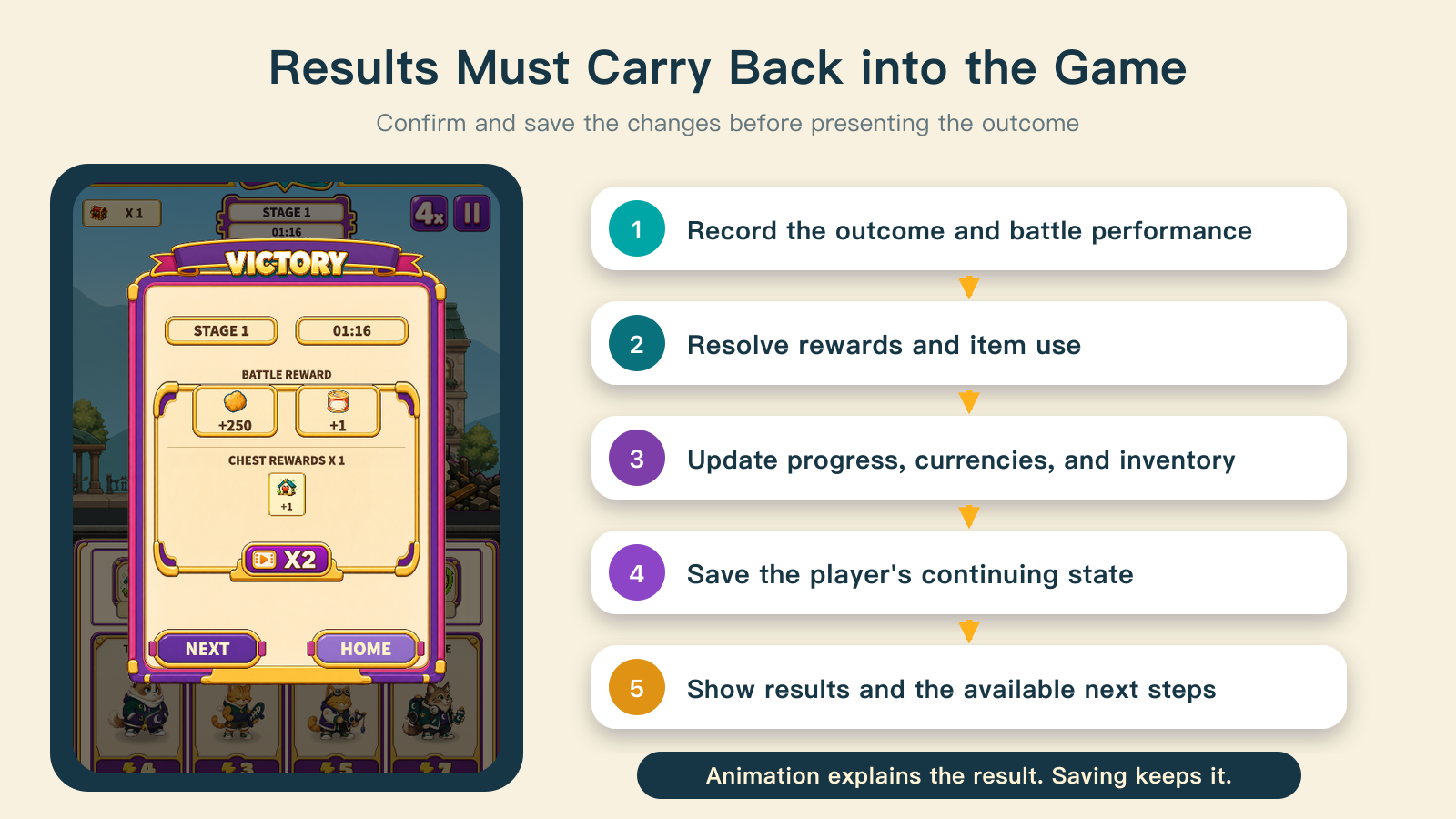
After a win, players could move to the next level if they had not reached the release's level limit, or return Home. After a loss, they could retry or go back to prepare. Either way, the resource changes from the battle did not depend on keeping the results animation alive. The interface explained the outcome; the save carried it across pages and into the next session.
That order mattered. If a reward animation played before saving was attempted, a write failure could leave the visible reward at odds with the actual data. The implementation at this stage applied and saved the changes before presenting the result, so the next page could read the updated state.
A save holds continuity, not just a score
At this stage, Kibble Street TD needed to preserve the faction, highest level cleared, KIBBLE and CANS, upgrades, item inventory, battle items, formation, story progress, system unlocks, and tutorial state. Preferences such as sound and haptics also needed to return with the next session.
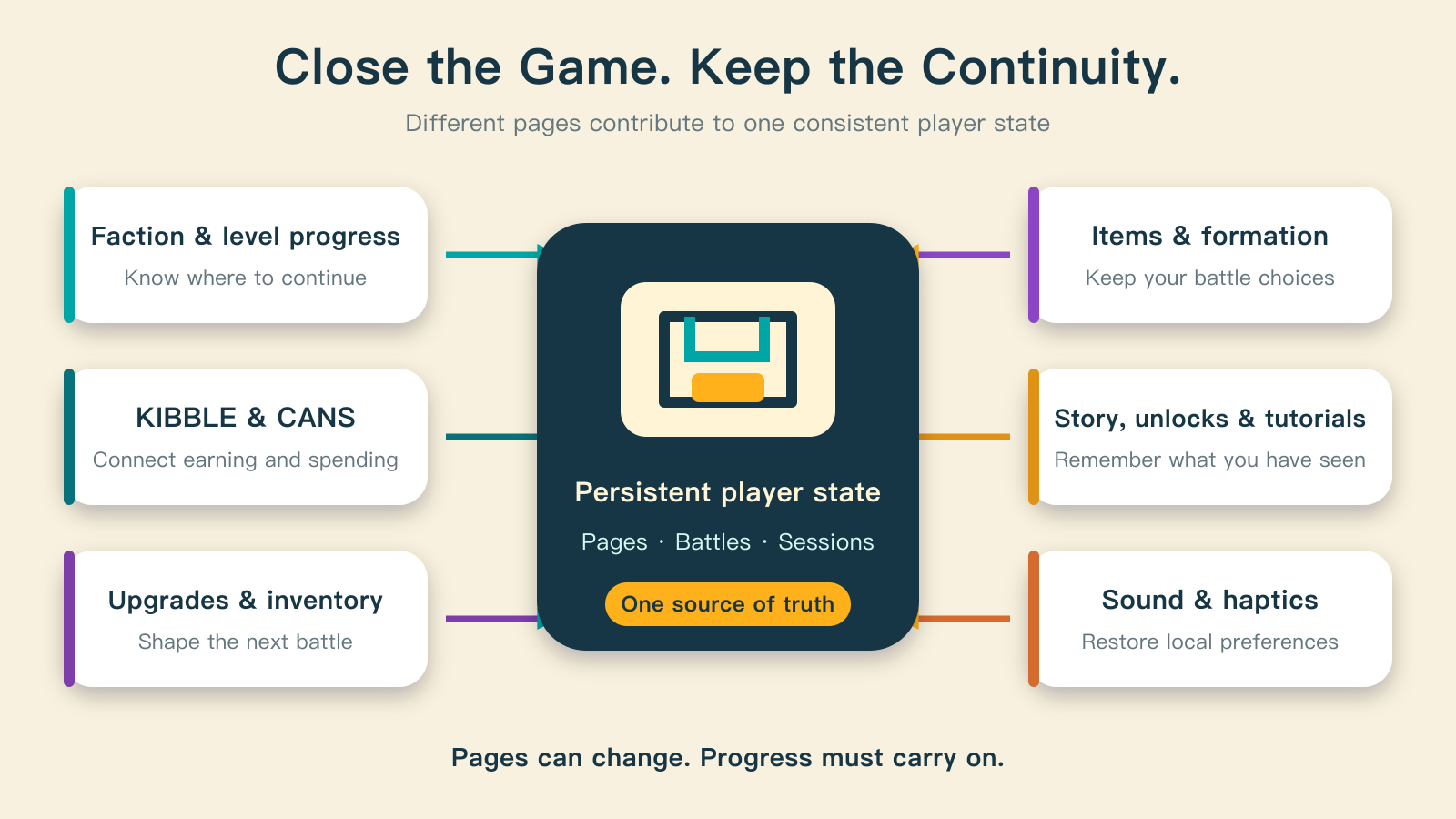
The information came from different pages, but it had to describe the same player. Items gained in the shop had to be available during battle preparation. Purchased upgrades had to reach the battle configuration. A cleared level had to change the destination of Home's GO button. Starting over had to return to the startup path with no faction selected.
Pages could keep changing, but their continuing state could not drift apart. At this point, the work was no longer just “draw every page.” It was “make sure every entry, return, and restart reconnects to the same flow.”
Who is responsible for this part?
The human defines the complete play loop: what players see first, what they can prepare before a battle, what they receive afterward, and which choices must last beyond the session.
AI helps inspect the inputs and outputs between pages. It can trace first launch, return visits, victory, defeat, retry, Home, and reset paths to find broken connections, then organize scattered rules into a flow that can be checked.
The engine supplies scene nodes, interface rendering, and local storage. It does not decide which data belongs to the same player state, or design a reason to take the next action.
Where to start
Start with the shortest complete loop rather than a list of a dozen screens: launch, choose or restore an identity, reach the hub, play, produce a result, save, and return to the hub. For each page, write down what it reads, what it changes, and who uses those changes after the player leaves.
Then check at least six paths: first launch, a returning visit, victory, defeat, reopening after closing, and starting again after clearing progress. When all six connect back to the same loop, the battle has become part of a game.